
TL;DR:
- Effective document control for not-for-profits requires a maintained register with version tracking, mapped to standards, and a clear review process. Regulators expect active oversight, with evidence like training records, review minutes, and version histories to demonstrate compliance. The Planning and Practice Hub offers tools and support to build systems that ensure accountability and pass audits.
Effective document control for a not-for-profit means every policy, procedure and record is demonstrably current, attributable and traceable — and that standard is what the NDIS Quality and Safeguards Commission, the Aged Care Quality and Safety Commission, and the Australian Charities and Not-for-Profits Commission (ACNC) will each test in their own way. The Planning and Practice Hub works with boards and quality managers across Australian human services to build exactly this kind of system. Three actions you can take today:
- Publish a Document Control Register — a master index of every controlled document, with version, owner, review date and linked standard.
- Add version control metadata to every controlled document: document number, version number, effective date, approving authority and review date.
- Schedule an owner-led annual review for each document, recorded in the register and minuted at board level.
What do regulators and your board actually expect?
Each regulator frames the expectation slightly differently, but the underlying ask is the same: show us the system is actively maintained, not assembled the night before an audit.
| Regulator / Standard | Key document control expectation | Typical audit artefact requested |
|---|---|---|
| NDIS Quality and Safeguards Commission (Quality Indicator 2.4) | Information management system that keeps participant records accurate, current and accessible; documents stored with defined access, retention and destruction processes | Document Control Register, version history for a specific policy, staff acknowledgement logs |
| Aged Care Quality and Safety Commission (Strengthened Aged Care Quality Standards) | Governing body accountable for current, reviewed policies informed by evidence-based practice and accessible to workers | Policy register, evidence of governing body review, training records |
| ACNC Governance Standards | Records kept for seven years, disposed of systematically under a retention and destruction policy; public trust demonstrated through sound governance | Financial and operational records, destruction log, governing document version history |
The board's accountability goes beyond storage. Under the Strengthened Aged Care Quality Standards, the governing body must maintain oversight of the quality system and report quality performance information to the board. That means the board should see a regular report showing which documents were reviewed, who approved them, and what changed — not just a file count.
An inspector at an NDIS audit will often ask for the Document Control Register as the first item, because a complete register confirms the system is actively maintained rather than assembled for the visit.
Core components your document control regime must include
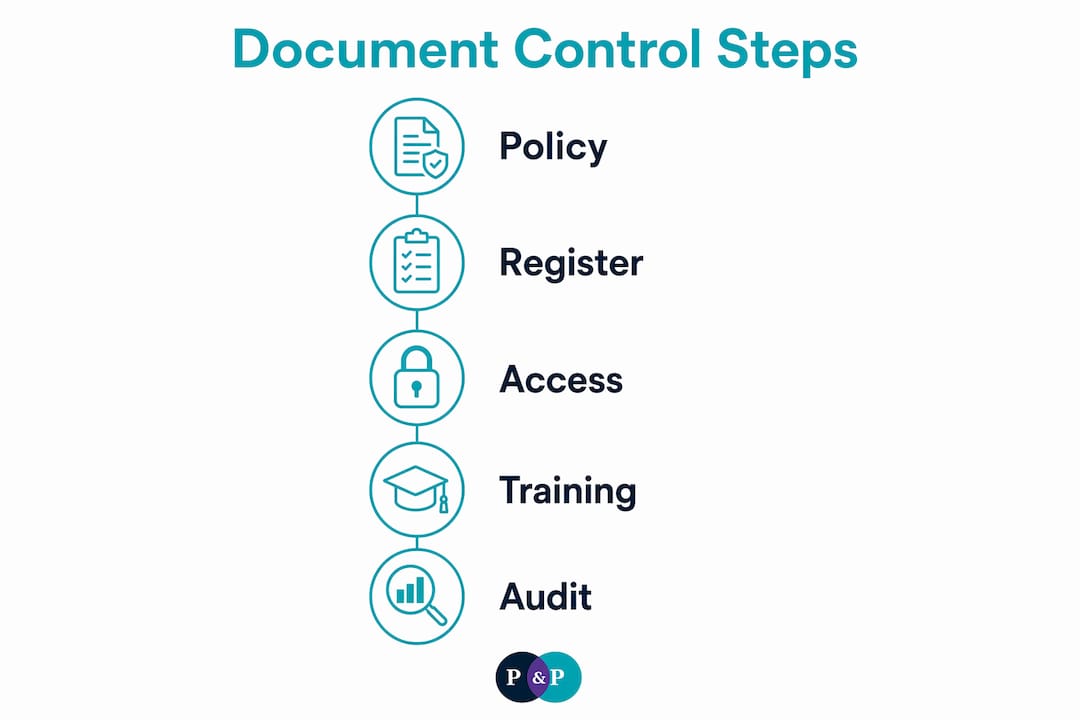
A governance-compliant system needs more than a shared drive. The minimum components are: a Document Control Policy (with its own control box), a Document Control Register as the master index, naming and version conventions applied consistently, role-based access and approval workflows, a documented review schedule, retention and destruction rules, and training acknowledgement records.

The register itself is the centrepiece. Each entry should carry these fields:
| Field | Purpose |
|---|---|
| Document number | Unique identifier for cross-referencing |
| Title and document type | Distinguishes policies, procedures, forms and plans |
| Version number | Confirms currency at a glance |
| Effective date and review date | Drives the review schedule |
| Document owner | Accountable person for content accuracy |
| Approving authority | Board, CEO or delegated manager |
| Linked standard / regulator | Maps to NDIS Practice Standards, Strengthened Aged Care Quality Standards, ACNC Governance Standards, National Principles for Child Safe Organisations, etc. |
| Storage location | Exact path or system reference |
| Retention period | Aligned to ATO / ACNC / NDIS obligations |
| Status | Current, under review, superseded, archived |
A compliance register alongside the document control register — tracking legal, contractual and reporting obligations — is also recommended practice for quality management in human services.
How do you implement this in a small-to-medium Australian NFP?
A phased rollout across roughly 20 weeks is realistic for most organisations. The phases below assume a board sponsor, a nominated document controller, an IT or operations owner, and a quality manager.
Phase 1: Scope and register build (weeks 1–4)
- Board sponsor formally endorses the project and assigns the document controller role.
- Document controller conducts a document audit: list every policy, procedure, form and plan currently in use.
- Identify shadow files and duplicates; flag superseded versions for archiving.
- Build the register in your chosen platform and populate existing documents.
- IT owner confirms storage locations, backup settings and access permissions.
Phase 2: Standardise templates and access controls (weeks 5–12)
- Adopt a standard naming convention (e.g., POL-GOV-001 for governance policies).
- Apply version control metadata to every controlled document.
- Set role-based access: read-only for most staff, edit rights mapped to document owners, approval rights to the relevant authority.
- Map each document to its linked standard or regulator in the register.
- Quality manager reviews governance documentation for completeness against NDIS Practice Standards and Strengthened Aged Care Quality Standards.
Phase 3: Training, verification and audit pack (weeks 13–20)
- Deliver staff training with acknowledgement records captured in the register.
- Quality manager conducts a verification review: confirm all documents are current and register entries are complete.
- Compile the audit evidence pack (see Section 6).
- Board sponsor tables a summary report at the next board meeting.
Ballpark cost considerations: internal hours are the largest input, typically 40–80 hours across phases 1–2 for a medium NFP. A document management subscription (SharePoint, Google Workspace, or a purpose-built platform) adds modest recurring cost. If your organisation lacks an internal quality manager, engaging an NDIS compliance consultant for phases 1–2 is worth considering.
Choosing tools and avoiding shadow files
Technology choice matters less than workflow fit. Select a platform against these criteria: searchable index, full audit trail, role-based access, reliable offline access for field staff, integration with your existing accounting or CRM system, and a tested backup and disaster recovery capability. Building a culture of compliance around the system is what makes the technology stick.
Shadow files are the most common failure mode. Digital transition fails when systems do not simplify daily workflows, so staff revert to personal copies. To prevent this:
- Map daily workflows before selecting a tool — ask frontline staff where they currently find documents.
- Pilot with a small team before full rollout; use their feedback to refine search and access.
- Mandate single master copies and communicate clearly that personal-device storage is not permitted.
- Create quick-reference job aids showing staff exactly how to find, use and acknowledge a document.
Red flags that require corrective action: poor or absent search function; no audit trail on edits; documents stored on personal devices or in personal email; no role-based permissions; no backup verification record.
Access control should be role-based rather than a generic read-only setting. Map each editable field to a specific role to prevent accidental deletion and unauthorised version changes.
What should you show inspectors, auditors and the board?
Auditors prefer outcome-based evidence over process paperwork alone. Your evidence pack should include:
| Artefact | What it demonstrates |
|---|---|
| Document Control Register export | Active maintenance; version currency |
| Sample version histories (2–3 key policies) | Changes tracked, approvals recorded |
| Training and acknowledgement logs | Staff awareness and competency |
| Recent board or management review minutes | Governing body oversight |
| Incident-linked policy revisions | Continuous improvement in response to practice |
| Retention and destruction records | Privacy and regulatory compliance |
A simple mapping table — showing which document maps to which Practice Standard outcome or ACNC Governance Standard — is one of the most useful tools during an audit. Prepare it as a one-page annex to the register export.
For the board, a one-page report works well: state the issue or review finding, provide an evidence snapshot (e.g., "87% of controlled documents reviewed on schedule"), assign a risk rating, and name the recommended action and owner.
An anonymised example from practice
A medium-sized community services NFP operating across two states had 140 policies spread across three shared drives, a staff intranet and individual managers' desktops. An NDIS certification audit returned two non-conformances: policies were not demonstrably current, and there was no evidence of staff acknowledgement. The board had no visibility of either issue.
A board-sponsored document controller was appointed. Over 16 weeks, the team built a Document Control Register, archived superseded versions, standardised naming conventions, and delivered a two-hour training session with digital acknowledgement capture. By the time of the surveillance audit, the time to locate the current version of any policy had dropped from an average of 12 minutes to under two minutes. Both non-conformances were cleared. Staff acknowledgement rates reached 94% within the first review cycle, and the number of incidents attributed to procedural confusion fell noticeably in the following quarter.
The practical lesson: the register and the training are inseparable. One without the other does not satisfy an auditor or a board.
How long should you keep records, and when can you destroy them?
ACNC-registered charities must retain financial and operational records for seven years. NDIS providers must retain records for a significant period after the last service for most records; for participants under 18, retention continues until the participant reaches adulthood or for a substantial period, whichever is longer. These periods differ, so your register must carry a retention period field for every document, and your Document Control Policy must specify a destruction process.
Destruction must be systematic and documented. The ACNC is clear that records should be disposed of according to a Data Retention and Destruction Policy as part of privacy obligations — not deleted ad hoc when storage fills up. Log every destruction event: document number, title, destruction date, method and authorising officer.
How do you handle sensitive and confidential information?
Human services NFPs hold some of the most sensitive personal information in the community: participant health records, incident reports, financial hardship data, and child protection information. The Privacy Act 1988 and the Australian Privacy Principles govern how this information is collected, stored, accessed and destroyed.
Practical controls include: classifying documents by sensitivity level in the register (e.g., public, internal, confidential, restricted); applying stricter role-based access to confidential and restricted documents; storing sensitive records in encrypted, access-logged systems; and including privacy obligations in staff training and acknowledgement records. For organisations subject to the National Principles for Child Safe Organisations, child-related records warrant their own retention and access rules, documented separately in the register.
What happens if your document system fails?
Disaster recovery for document control is not a theoretical concern. A ransomware attack, a cloud provider outage, or a staff member accidentally deleting a shared drive can leave an organisation unable to demonstrate compliance at exactly the wrong moment.
Your contingency plan should cover: automated daily backups to a separate location (not the same drive or account); a tested restoration process with a documented recovery time objective; offline copies of the most critical documents (Document Control Policy, current register export, key operational policies); and a clear escalation path if the primary system is unavailable. Test the restoration process at least annually and record the test outcome. The board should see evidence of this test in its governance reporting.
Key takeaways
Effective document control for a not-for-profit requires a maintained Document Control Register, role-based access, version-controlled policies mapped to regulator standards, and documented retention and destruction rules.
| Point | Details |
|---|---|
| Register first | A Document Control Register is the first artefact auditors request; build it before anything else. |
| Retention differs by regulator | ACNC requires seven years; NDIS requires seven years from last service (or until age 25 for participants under 18). |
| Board accountability is explicit | Under the Strengthened Aged Care Quality Standards, the governing body must receive quality performance reports linked to document oversight. |
| Shadow files are a compliance risk | Systems that do not fit daily workflows drive staff to personal copies, undermining audit evidence. |
| The Planning and Practice Hub | Supports boards and quality managers to build the register, map documents to Practice Standards, and prepare audit evidence packs. |
Why document control is really a governance question
Most boards I work with treat document control as an administrative task delegated entirely to the quality team. That framing creates a gap. When an auditor asks the board to demonstrate active oversight of the quality system, a folder of policies is not the answer. The answer is a register with board-approved review dates, minutes showing the board received a quality report, and evidence that staff can find and use current documents.
The modest investment in building this system properly — one clear owner, a maintained register, and a training cycle — is small compared to the cost of a major non-conformance, a delayed certification, or a funding body's loss of confidence. Organisations that treat document governance as a board matter, not just a quality team task, tend to sail through audits. Those that do not tend to find out the hard way.
The cultural risk is just as real. One organisation I know of had a technically sound register but frontline staff who had never been shown how to use it. The documents existed; the practice did not follow them.
Which three documents would your board ask to see right now to prove your controls are working?
How The Planning and Practice Hub can help
The Planning and Practice Hub works with boards and quality managers in Australian human services NFPs to build document control systems that hold up under scrutiny. The practical offer is straightforward: a Document Control Register template mapped to your specific regulators, policy templates with standardised control boxes, and a phased implementation plan your team can execute without starting from scratch.
The deliverables are co-developed with your team, so the system reflects your actual workflows rather than a generic framework. If you are preparing for an NDIS certification audit, a strengthened aged care standards assessment, or an ACNC governance review, the right time to build this is before the notice arrives. Visit The Planning and Practice Hub's consulting services page to discuss what your organisation needs.
Useful sources
- NDIS Practice Standards and Quality Indicators — the primary reference for Quality Indicator 2.4 (information management); bring this to any NDIS audit meeting.
- Strengthened Aged Care Quality Standards — the Aged Care Quality and Safety Commission's current standards; essential for mapping policies to outcome statements.
- ACNC record-keeping tool — practical guidance on what records to keep, for how long, and how to dispose of them; useful for building retention fields in the register.
- ATO record-keeping for not-for-profits — covers the seven-year retention obligation for ACNC-registered charities; cross-reference with NDIS retention rules when populating the register.
- ACNC Governance Standards — the six governance standards every registered charity must meet; Governance Standard 1 and the record-keeping obligations are directly relevant to document governance.
- The Planning and Practice Hub resources — practical guidance on governance documentation, policy development and audit preparation for Australian human services NFPs.
FAQ
What is a Document Control Register and why does it matter?
A Document Control Register is a master index of every controlled document in your organisation, recording version, owner, review date, approving authority and linked regulatory standard. Auditors from the NDIS Quality and Safeguards Commission and the Aged Care Quality and Safety Commission typically request it first because it demonstrates the system is actively maintained.
How long must an Australian NFP keep its records?
ACNC-registered charities must retain financial and operational records for an extended period. NDIS providers must retain records for at least seven years after the last service, or until a participant under 18 turns 25, whichever is longer. Retention periods differ by regulator and document type, so include a retention field in your register.
What triggers a non-conformance at an NDIS audit related to documents?
The most common trigger is an information management system that cannot demonstrate policies are current and accessible. Missing version histories, no staff acknowledgement records, and an absent or incomplete Document Control Register all commonly result in non-conformances under Quality Indicator 2.4.
How do you stop staff creating shadow files?
Map daily workflows before selecting a platform, pilot with frontline staff, and mandate single master copies. Systems that are hard to search or access offline drive staff to personal copies; prioritise searchability and simple acknowledgement flows when choosing your document management tool.
Can The Planning and Practice Hub help build a Document Control Register?
Yes. The Planning and Practice Hub supports NFPs to build a Document Control Register mapped to their specific regulators, develop standardised policy templates, and prepare audit evidence packs. Details are available on the NFP governance services page.